
Are you looking to join an agency on Poppo Live but don’t know where to start? The process is simple, and you can complete it directly through the Poppo Live application.
In this guide, we’ll explain how to find the agency section, enter an agent ID, and submit your request to join an agency.
What Do You Need to Join a Poppo Live Agency?
Before getting started, make sure you have:
- The Poppo Live application installed on your mobile device.
- Access to your Poppo Live account.
- The correct agency ID provided by the agency you want to join.
For this tutorial, we’ll use the following agency ID:
Agency ID: 47910163
If you want to join a different agency, make sure you obtain its correct ID before proceeding.
Step 1: Open Your Poppo Live Profile
Open the Poppo Live application and log in to your account.
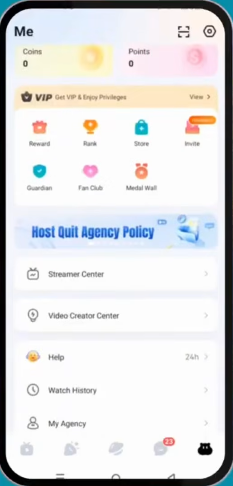
Navigate to your profile page by tapping the profile icon, usually located in the bottom-right corner of the screen.
Step 2: Find the My Agency Section
On your profile page, scroll down until you find the section labeled My Agency.
Tap on My Agency to open the agency page, where you can enter the ID of the agency you want to join.
Step 3: Enter the Agency ID
On the My Agency page, look for the field labeled Enter Agent’s ID.
Enter the agency ID provided by your chosen agency.
For this tutorial, the ID is:
47910163
Double-check the number before continuing to make sure you haven’t entered it incorrectly.
Step 4: Confirm Your Request
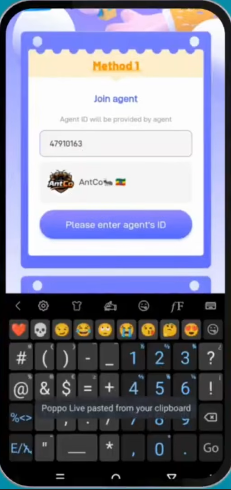
After entering the correct agency ID, tap Confirm to submit your request.
Follow any additional instructions displayed by the application. Depending on the platform’s current procedures and your account status, you may need to wait for the request to be processed before your agency affiliation is finalized.
Once the process is complete, check the My Agency section to verify your agency status.
Important Things to Know Before Joining an Agency
Before submitting your request, keep these points in mind:
- Verify the agency ID: Make sure the ID belongs to the agency you intend to join.
- Check your current agency status: If you’re already affiliated with another agency, you may need to leave or obtain a release before joining a new one.
- Follow platform requirements: Any applicable restrictions or waiting periods may affect when you can join another agency.
- Contact your agency representative: If your request doesn’t go through, ask the agency for assistance or contact official Poppo Live support.
Conclusion
Joining an agency on Poppo Live is easy when you know where to find the correct settings. Simply open your profile, navigate to My Agency, enter the agency ID, and tap Confirm to submit your request.
By following these steps, you can get started with the agency you want to join and explore the opportunities available on Poppo Live.
For more tutorials, tips, and step-by-step guides, keep visiting PoppoLive.xyz!