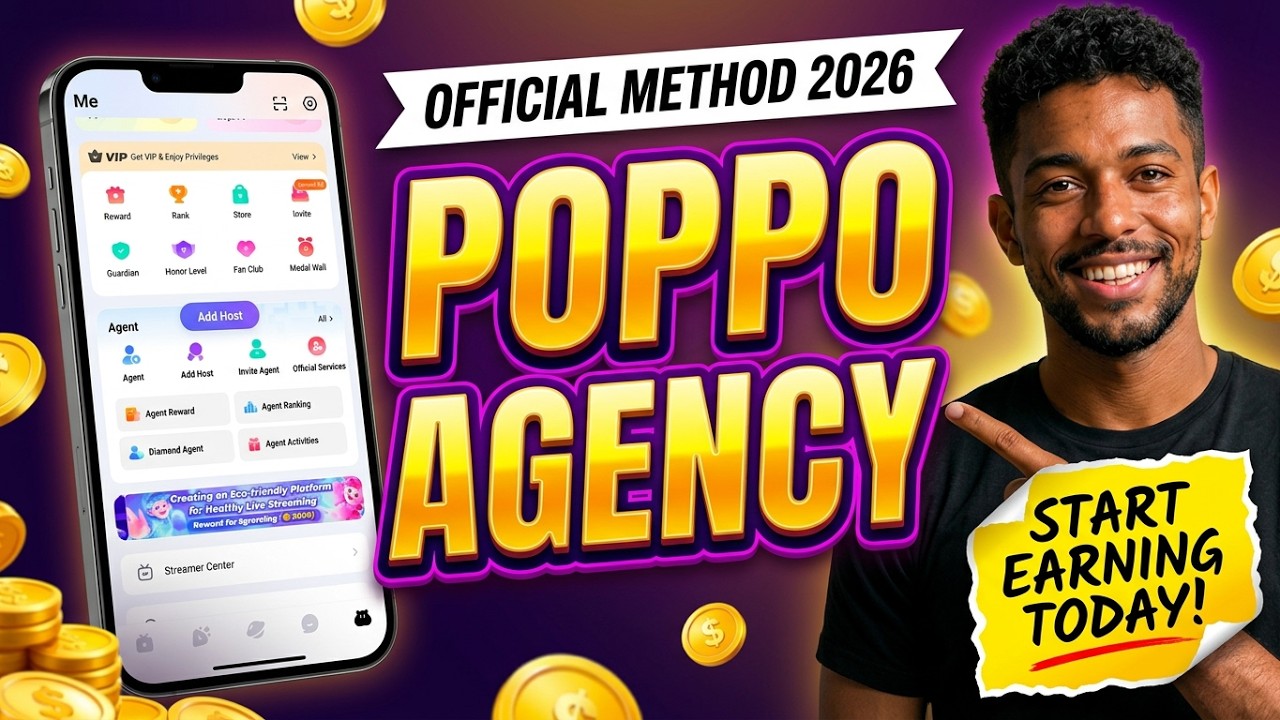
Do you want to start your own agency on Poppo Live and build a team of livestream hosts? Creating an agency can be an opportunity to grow your presence on the platform, recruit hosts, develop subagencies, and potentially earn commissions based on your agency’s performance and the platform’s rules.
In this guide, we’ll explain how to create your own Poppo Live agency, from downloading the application to submitting your agency registration request.
What Do You Need to Create a Poppo Live Agency?
Before starting, make sure you have the following:
- The official Poppo Live application installed on your mobile device.
- An active Poppo Live account.
- Your Poppo ID.
- Access to the agency creation page.
- Access to the verification code sent through the Poppo Live application.
Once you have these ready, you can begin the registration process.
Step 1: Download and Set Up the Poppo Live App
First, download the official Poppo Live application on your mobile device.
If you’re new to the platform, open the app and create an account using one of the available registration methods. If you already have an account, simply log in.
After logging in, make sure you can access your profile and locate your Poppo ID. You’ll need this information to complete the agency registration process.
Step 2: Open the Agency Creation Page
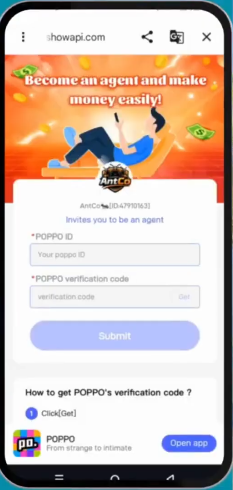

Next, open the official agency creation link provided for the registration process.
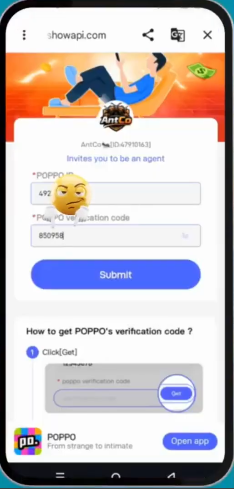
The page should display fields where you can enter your Poppo ID and a verification code.
Make sure you’re using the correct agency registration page before entering your account information. Avoid unofficial websites that request unnecessary personal details or account credentials.
Step 3: Find and Copy Your Poppo ID
Now, return to the Poppo Live application to retrieve your account ID.
Follow these steps:
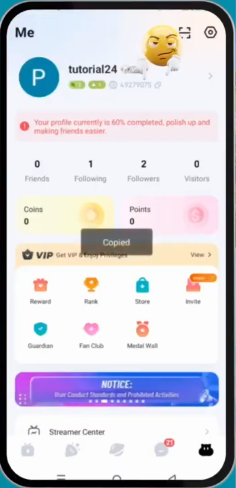
- Open Poppo Live.
- Navigate to your profile page.
- Locate your Poppo ID.
- Tap the copy option next to the ID, if available.
Return to the agency creation page and paste your Poppo ID into the first field.
Double-check the ID to make sure it matches your account.
Step 4: Request Your Verification Code
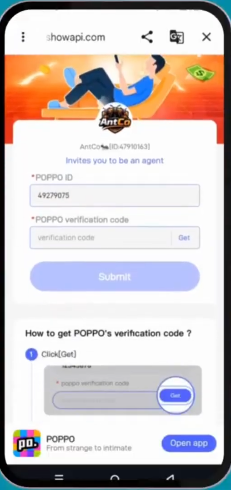
After entering your Poppo ID, tap the Get button on the agency creation page.
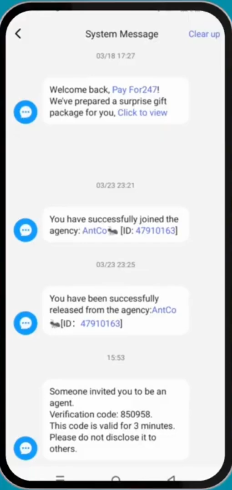
The system should send a verification code or one-time password (OTP) through the Poppo Live application.
To retrieve the code:
- Open the Poppo Live app again.
- Tap the message icon on the screen.
- Look for a system message containing your verification code.
- If you don’t see it in the main message area, check the official messages section.
Once you find the code, copy it carefully.
Note: The location of system messages may vary depending on your app version.
Step 5: Enter the Verification Code
Return to the agency creation page.
Paste the verification code into the second field, making sure you enter it correctly.
If the code has expired or doesn’t work, follow the instructions on the page to request another code, if that option is available.
For your security, never share verification codes with other people or enter them on websites you cannot verify as official.
Step 6: Submit Your Agency Registration
After entering your Poppo ID and verification code, review the information you provided.
Click the Submit button to send your registration request.
If the information is correct and your account meets the platform’s requirements, the system should process your agency registration.
Follow any additional instructions displayed on the page to confirm that your agency has been created successfully.
Congratulations! You’re ready to explore the tools and features available to agency owners.
What Can You Do After Creating Your Poppo Live Agency?
Once your agency is established, you can explore opportunities to develop your business on Poppo Live.
Recruit and Manage Hosts
You can work on building a team of livestream hosts, helping them understand the platform, and supporting their development.
Develop Subagencies
Depending on your agency level and the platform’s current rules, you may be eligible to establish or manage subagencies.
Earn Agency Commissions
Poppo Live may offer agency commissions based on qualifying performance and activity. Your earnings can depend on factors such as agency level, host performance, applicable commission rules, and other platform requirements.
Keep in mind that creating an agency does not guarantee income. Building an active team and understanding the commission structure are important steps toward developing a sustainable agency business.
Common Problems When Creating a Poppo Live Agency
I Can’t Find My Poppo ID
Open your profile page in the Poppo Live application and look for your account ID. Use the copy option if available.
I Haven’t Received the Verification Code
Check your system messages and official messages section. Make sure you entered the correct Poppo ID, and request a new code if the platform allows it.
The Agency Registration Page Isn’t Working
Check your internet connection and ensure you’re using the correct registration link. You can also try again later or contact official Poppo Live support.
My Agency Registration Was Not Successful
Review the information you entered and check whether your account meets the current agency registration requirements. If the problem continues, consult official platform support.
Conclusion
Creating your own Poppo Live agency involves a few straightforward steps: download the app, locate your Poppo ID, open the agency creation page, request a verification code, enter the code, and submit your registration.
After your agency is created, you can begin exploring host recruitment, agency management, and the available opportunities for growing your business.
For more Poppo Live tutorials, agency guides, and helpful tips, visit PoppoLive.xyz and continue learning how to make the most of the platform.